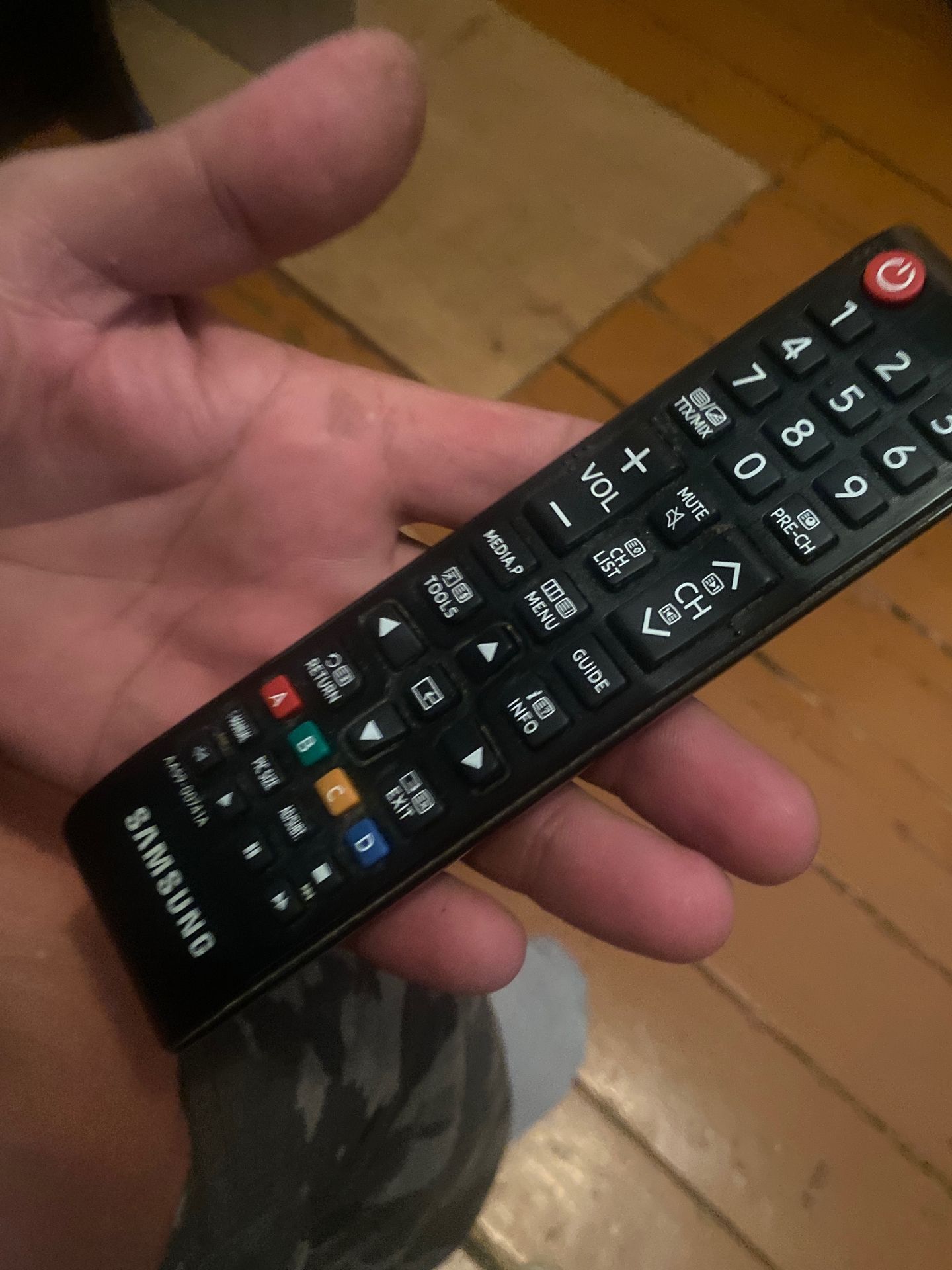
Please identify all visible buttons and their functions on the remote control.
Remote Control Buttons and Functions:
- Power Button: Red button with a circular arrow, typically used to turn the device on or off.
- Number Buttons: Labeled 0-9, used for channel selection or inputting numbers.
- Volume Buttons: '+' and '-' labeled buttons, used to increase or decrease audio volume.
- MUTE Button: Used to silence the audio output.
- PRE-CH Button: Likely stands for 'Previous Channel', used to switch back to the last viewed channel.
- TTX/MIX Button: Associated with Teletext services, potentially for mixing audio or selecting teletext modes.
- Channel Buttons: 'CH LIST' (Channel List) and 'CH' with up/down arrows, used for navigating through channels.
- Navigation Buttons: A directional pad (up, down, left, right arrows) with an 'OK' or 'Enter' button in the center, used for menu navigation and selection.
- MEDIA.P Button: Likely for accessing media playback functions.
- MENU Button: Opens the main settings or menu interface.
- TOOLS Button: Accesses additional options or tool menus.
- GUIDE Button: Opens the Electronic Program Guide (EPG).
- INFO Button: Displays information about the current program or content.
- RETURN Button: Used to go back to the previous screen or menu.
- EXIT Button: Closes menus and returns to normal viewing.
- Colored Buttons: Red, Green, Yellow, and Blue buttons (labeled A, B, C, D on the remote), often used for specific functions within menus or applications (e.g., teletext functions, interactive services).
- Other Buttons: 'PIC SIZE' (Picture Size), 'AD/SUBT' (Audio Description/Subtitle), buttons with playback controls (play, pause, stop, rewind, fast forward, record - although not all are clearly visible or labeled).
- Brand Name: 'SAMSUNG' is clearly visible at the bottom of the remote.
- Model/Code: 'AA59-00741A' is also visible.

 Алгебра
 Английский
 Биология
 География
 Геометрия
 История
 Русский
 Обществознание
 Физика
 Химия
Химия Информатика
 Литература
 Математика